
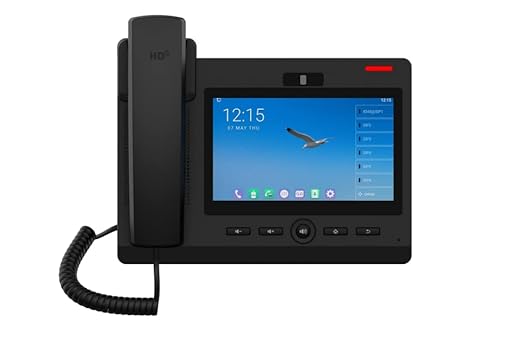
Description
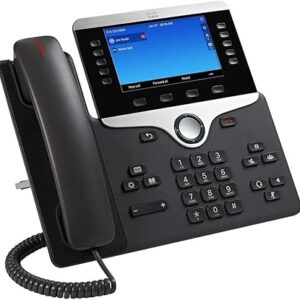
The Fanvil F600S Android IP Phone is a powerful Fanvil IP phone designed for modern business communication. It offers a smooth Android experience, clear HD audio, and reliable performance. Moreover, it is considered one of the best IP Phone solutions for offices that need efficiency and flexibility.
Key features
The Fanvil F600S Android IP Phone delivers strong performance with an advanced Android system that ensures smooth operation and easy IP phone configurations. It provides HD voice quality for clear communication while supporting multiple SIP accounts to manage calls efficiently. In addition, it includes built-in Wi-Fi and Bluetooth connectivity, which improves flexibility and device pairing. Furthermore, the device allows quick and simple Fanvil IP phone setup, so users can start working without delay. As a result, this Fanvil IP phone combines performance, speed, and reliability for daily business use.
Application Fanvil F600S Android IP Phone
The Fanvil F600S Android IP Phone is ideal for offices, call centers, and corporate environments. It helps teams handle calls smoothly and improves communication flow. Moreover, businesses comparing devices like IP phone prices in Pakistan, like Polycom, will find this phone a practical and efficient alternative. It also works well for reception desks and remote setups where reliable communication is important.
Why Choose the Fanvil F600S Android IP Phone?
The Fanvil F600S Android IP Phone is a smart choice because it offers modern features at a competitive Fanvil IP Phone price in Pakistan. In addition, it provides a user-friendly interface, strong performance, and long-term reliability. While many users search for the Fanvil IP Phone F660S Android price, this model delivers similar advanced features, making it a cost-effective and dependable option for businesses.
For more products, click here.
Frequently Asked Questions:
What are the main features of the Fanvil F600S Android IP Phone?
It includes HD audio, Android OS, Wi-Fi, Bluetooth, and support for multiple SIP accounts.
How can I change my IP address on my IP phone?
You can change the IP address on your IP phone by accessing the phone’s network settings menu or web interface and manually updating the IP configuration.
How does it compare with other IP phones in Pakistan?
It offers great value compared to options like IP phone prices in Pakistan, such as Polycom, with reliable performance and useful features.

Reviews
There are no reviews yet.