
Business communication is no longer limited to traditional telephone lines or employees sitting inside one office. Today, companies need flexible communication systems that connect office teams, remote employees, customers and multiple branches through one reliable platform. A Virtual PBX System makes this possible by moving business phone management to an internet-based environment.
Whether you operate a small business, corporate office, educational institute, hospital, sales department or call center, a virtual phone system can help you organize incoming and outgoing calls, manage extensions, route customers to the right department and maintain professional communication.
For businesses in Pakistan, a Virtual PBX System can also reduce dependence on traditional telephone infrastructure and make it easier to expand communication as the company grows. With IPPBX, businesses can explore virtual PBX, Cloud PBX, IP PBX, SIP connectivity and call center solutions designed around their communication requirements.
If you are comparing the best Virtual PBX in Pakistan, this guide explains how the technology works, its important features, business benefits, costs and the factors to consider before choosing a provider.
What Is a Virtual PBX System?
A Virtual PBX System is a business telephone solution that manages calls through an internet-connected platform instead of relying entirely on a physical telephone exchange installed at the office.
PBX stands for Private Branch Exchange. Traditionally, businesses used PBX equipment to connect internal telephone extensions and manage calls between employees. A virtual PBX provides similar call-management capabilities through hosted or software-based infrastructure.
Employees can connect using compatible IP phones, desktop softphones, web applications or mobile devices, depending on the platform and configuration.
For example, a customer calls your main business number. The virtual PBX can play a welcome message, offer department options through an Interactive Voice Response (IVR) menu, and route the caller to sales, support, accounts or another extension.
Example call flow:
Business Number → Welcome Message → IVR Menu → Department Queue → Employee Extension
This gives customers a more organized experience while allowing businesses to manage communication centrally.
How Does a Cloud PBX System Work?
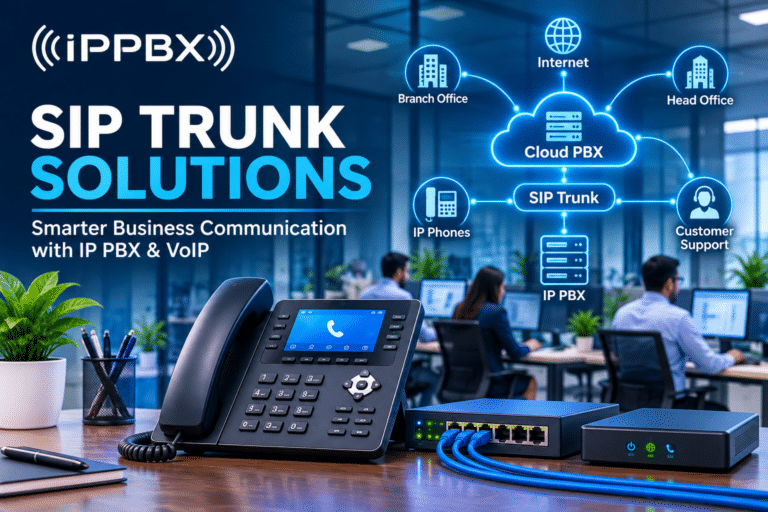
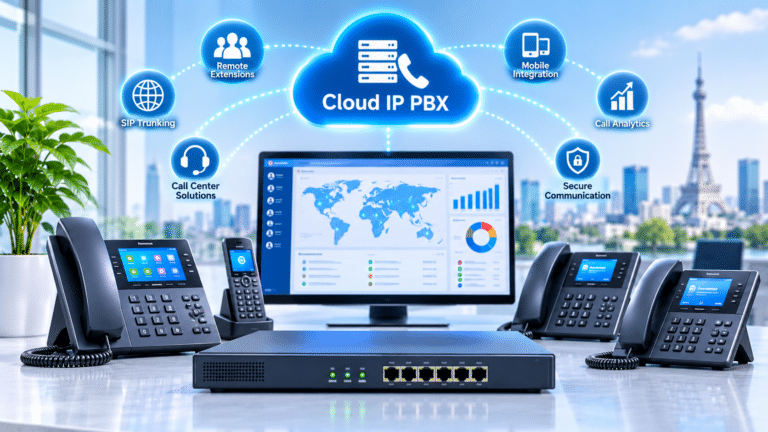
A Cloud PBX System hosts the PBX software and call-management functions on cloud infrastructure or a service provider’s hosted environment. Instead of maintaining all the telephone exchange equipment at the office, users connect to the hosted system over an internet connection.
A typical setup includes:
- Business phone number: Customers call the company’s published number.
- SIP connectivity: The call reaches the PBX through a SIP trunk or supported telephone connection.
- Cloud PBX platform: The system processes the incoming call and applies the configured call rules.
- IVR and call routing: The caller selects a department or is routed automatically.
- Employee device: The call reaches an IP phone, softphone or supported mobile application.
This arrangement can support employees working from different locations, provided the network, service configuration and endpoints are suitable.
Businesses can explore IPPBX’s Cloud PBX and Virtual PBX solutions to understand hosted and software-based deployment options.
Why Do Businesses Need a Virtual PBX System in Pakistan?
A professional business phone system is not simply a way to make calls. It is part of customer service, sales operations and internal coordination.
A Virtual PBX System can be useful for several types of organizations.
1. Support Remote and Hybrid Teams
Employees do not always need to work from the same office to remain connected. With properly configured remote extensions, authorized employees can handle business calls from different locations using supported devices.
This is useful for companies with remote sales teams, customer support representatives and employees working across multiple cities.
2. Manage Multiple Departments
A business can use one main number and route calls to departments such as sales, accounts, customer support and management. This helps customers reach the right team without calling multiple numbers.
3. Improve Customer Call Handling
IVR menus, ring groups and call queues help organize incoming calls. When configured correctly, these features can reduce unnecessary transfers and help businesses manage busy periods more effectively.
4. Support Business Expansion
Adding new employees or departments can be easier with a scalable virtual phone system than expanding a traditional telephone setup. The actual capacity depends on the selected platform, subscription, server resources and concurrent-call requirements.
5. Connect Multiple Branches
Businesses with offices in Lahore, Karachi, Islamabad or other cities can use a centralized PBX architecture to manage extensions and call routing across locations.
6. Improve Call Visibility
Depending on the platform, administrators can review call logs, recording access, extension activity and reports. These tools can support operational monitoring and customer-service improvement.
Important Features of the Best Virtual PBX System
When comparing the best Virtual PBX System, evaluate the features that solve real communication problems rather than choosing a platform based only on its name or advertised price.
Interactive Voice Response (IVR)
IVR allows callers to interact with an automated menu. For example, callers can press 1 for sales, 2 for support and 3 for accounts. This helps organize incoming calls and directs customers to the relevant department.
Call Routing and Forwarding
Call routing directs incoming calls according to configured rules. Calls can be sent to specific extensions, departments, ring groups or alternative destinations.
Call forwarding can also help redirect calls when an employee is unavailable, subject to the system configuration.
Call Queues
Call queues organize callers waiting to speak with an available employee. They are especially useful for customer support departments and call centers that receive a high volume of incoming calls.
Call Recording
Call recording can support staff training, service-quality reviews and record keeping. Businesses should define access permissions, retention periods and appropriate privacy practices before enabling recording.
Voicemail
Voicemail allows callers to leave messages when employees are unavailable. Some PBX platforms also support voicemail notifications or delivery through email.
Remote Extensions
Remote extensions allow employees to connect to the business telephone system from supported locations and devices. This is particularly useful for distributed teams and work-from-home operations.
CRM Integration
CRM integration can connect call activity with customer records. Depending on the supported integration, employees may be able to view customer details, associate call logs with contacts or improve follow-up workflows.
Reporting and Administration
An administration portal can help authorized staff manage extensions, users, call rules and reports. The available controls depend on the selected PBX platform.
Virtual PBX vs Traditional PBX: Which Is Better?
Both technologies can serve business communication needs, but their deployment models differ.
| Feature | Traditional PBX | Virtual / Cloud PBX |
|---|---|---|
| Infrastructure | Physical PBX equipment | Hosted or virtual infrastructure |
| Remote access | May require additional configuration | Often designed for remote connectivity |
| Expansion | May require hardware changes | Can be easier to scale |
| Management | Often managed on-site | Commonly managed through an online interface |
| Multiple branches | May require additional networking | Can support centralized deployment |
| Maintenance | Hardware and on-site support | Depends on hosting and service arrangement |
| Internet dependency | Depends on architecture | Requires suitable internet connectivity |
A traditional PBX may still be suitable for organizations with specific infrastructure requirements. A Virtual PBX is worth considering when flexibility, remote access and centralized call management are priorities.
Virtual PBX System for Small Businesses, Offices and Call Centers
Different organizations need different PBX configurations.
Small businesses: A small company may need a main business number, a few extensions, call forwarding and a basic IVR menu.
Corporate offices: Larger offices may require department-based routing, multiple ring groups, call recording, reporting and integration with business applications.
Call centers: Call centers may require advanced queues, agent management, live monitoring, dialers, call recording and performance reporting.
Multi-branch companies: Organizations with several locations may benefit from centralized extensions and coordinated call routing.
For more specialized contact-center requirements, explore CallCenters.com.pk as an external resource for call center-related solutions and services.
Virtual PBX Pricing in Pakistan: What Determines the Cost?
The price of a Virtual PBX System in Pakistan depends on the deployment model and the features your business needs. There is no single price that applies to every company.
Common cost factors include:
- Number of users and extensions
- Number of business phone numbers or DIDs
- Concurrent call capacity
- SIP trunk or telecom connectivity
- IP phone hardware requirements
- Call recording and storage
- CRM or third-party integrations
- Advanced call center features
- Hosting, maintenance and technical support
A small office with a limited number of extensions may require a simpler setup than a multi-branch company or a contact center with dozens of agents.
Before choosing a package, request a configuration based on your expected users, call volume, locations and required features. This makes it easier to compare the total cost of ownership rather than looking only at the initial installation price.
Why Choose IPPBX for Virtual PBX Solutions?
Choosing a provider is as important as choosing the PBX platform. A successful deployment involves planning, configuration, network readiness, endpoint setup and ongoing technical support.
IPPBX provides business communication services that include IP PBX setup, Cloud PBX deployment, SIP and VoIP integration, IP phone installation and call center solutions.
Businesses can discuss requirements such as:
- Virtual and Cloud PBX deployment
- IP phone provisioning and extension setup
- SIP trunk and gateway integration
- IVR, call queues and ring groups
- Remote extensions and multi-branch connectivity
- Call recording and reporting
- CRM and business-system integration
- Technical support and maintenance
You can explore the IPPBX services page or browse available IP PBX systems and communication products.
How to Choose the Right Virtual PBX Provider
Before investing in a virtual phone system, ask the provider these practical questions:
- Does the system support the number of users and simultaneous calls we need?
- Can employees connect through IP phones and mobile or desktop softphones?
- Does it include IVR, queues, ring groups and call recording?
- Can it connect with our existing SIP trunks or business numbers?
- Does it support multiple offices and remote employees?
- What security, backup and recovery options are available?
- What technical support is included, and when is it available?
- Are there additional costs for hosting, numbers, call usage or integrations?
The right solution should fit your business workflow, not force your team to change every process around the phone system.
Book a Free Virtual PBX Demo with IPPBX
A demonstration is a practical way to understand how a Virtual PBX System can work for your organization. You can discuss your number of employees, call volume, department structure, remote-work requirements and preferred devices before selecting a deployment.
IPPBX can help you explore a suitable business communication setup for your office, company or call center in Pakistan.
Book your free demo today.
- Website: ippbx.com.pk
- Email: [email protected]
- WhatsApp / Phone: 0330 624 6232
Frequently Asked Questions About Virtual PBX Systems
1. What is a Virtual PBX System?
A Virtual PBX System is an internet-based business telephone platform that manages calls, extensions, IVR, forwarding and other communication functions without requiring a traditional PBX exchange at every office.
2. Is Virtual PBX suitable for small businesses in Pakistan?
Yes. A virtual phone system can be configured for small businesses that need a professional business number, a few extensions, call forwarding and basic call management. The required package depends on users and call volume.
3. What is the difference between Virtual PBX and Cloud PBX?
The terms are often used interchangeably. Virtual PBX generally describes a software-based PBX that is not tied to a traditional physical exchange at the office. Cloud PBX specifically emphasizes hosting the PBX platform on cloud infrastructure.
4. Can employees use a Virtual PBX from home?
Yes, if the selected platform supports remote extensions and the employee has a compatible device and suitable internet connection. Security and network configuration should be planned before remote access is enabled.
5. Does a Virtual PBX support call recording and IVR?
Many modern virtual PBX platforms support call recording and IVR. Availability, storage, configuration and licensing depend on the chosen platform and service package.
6. Can a Virtual PBX connect multiple office branches?
Yes. A suitable system can connect extensions across multiple locations through a centralized PBX architecture. The design depends on network connectivity, call capacity and business requirements.
7. How can I book a Virtual PBX demo in Pakistan?
Contact IPPBX through ippbx.com.pk or WhatsApp at 0330 624 6232 to discuss your requirements and request a free demo.
Key Takeaways
- A Virtual PBX System manages business calls through internet-based or hosted infrastructure.
- It can provide IVR, extensions, call routing, queues and recording.
- Cloud PBX can support remote employees and multi-branch organizations.
- The best system depends on users, concurrent calls, features and connectivity.
- Pricing should be evaluated according to the complete deployment, not just the advertised package.
- IPPBX offers PBX, cloud telephony, SIP, IP phone and call center-related services.
- A free demo can help identify the right configuration before deployment.
Contact Us – Get the Best Virtual PBX System in Pakistan
Looking for a reliable Virtual PBX System in Pakistan to improve your business communication? IPPBX provides business communication solutions, including Virtual PBX, Cloud PBX, IP PBX, SIP connectivity and call center systems.
Whether you need a phone system for a small office, a growing company or a multi-branch organization, our team can help you explore the right solution according to your business requirements.
Contact IPPBX today and book your FREE demo!
- Website: https://ippbx.com.pk/
- Email: [email protected]
- WhatsApp / Phone: 0330 624 6232
Book your free demo today and make your business communication smarter, simpler and more professional!